Data Explorer
The Data Explorer is an interactive visual browser for your Weaviate collections. Browse objects, apply filters, run vector searches, and export data — all with a rich table interface.
Key Capabilities
- Interactive table with sortable columns, configurable pagination, and column visibility management
- Visual filter builder with 10+ operators (Equal, Not Equal, Contains, Greater Than, Less Than, Like, ContainsAny, ContainsAll, IsNull, IsNotNull)
- AND/OR logic for combining multiple filter conditions
- Four vector search modes: Text (semantic), Object (similarity), Vector (raw embeddings), Hybrid (BM25 + vector)
- Query profiling — per-shard timing breakdowns to diagnose slow searches
- Data export to JSON or CSV (current page, filtered results, or entire collection)
- Virtual scrolling for large datasets (1000+ objects)
- Filter presets — save, load, and delete frequently used filter combinations
Vector Search Modes
Text (Semantic)
Uses nearText for concept-driven search. Requires a text vectorizer configured on the collection.
Similar Object
Finds objects similar to an existing object by its ID. Uses nearObject.
Raw Vector
Direct vector embedding input for advanced users. Uses nearVector.
Hybrid Search
Combines BM25 keyword matching with vector semantic search. Features:
- Alpha slider to balance keyword vs semantic weight
- Score breakdown showing keyword, semantic, and combined scores
- Property selection for targeted keyword search
- Preset buttons (Keyword Only, Balanced, Semantic Only)
Query Profiling
Requires Weaviate ≥ 1.36.9
Query profiling is available when the connected server supports query-profile metadata. On unsupported servers, the Profile control is disabled and identifies the minimum required version.
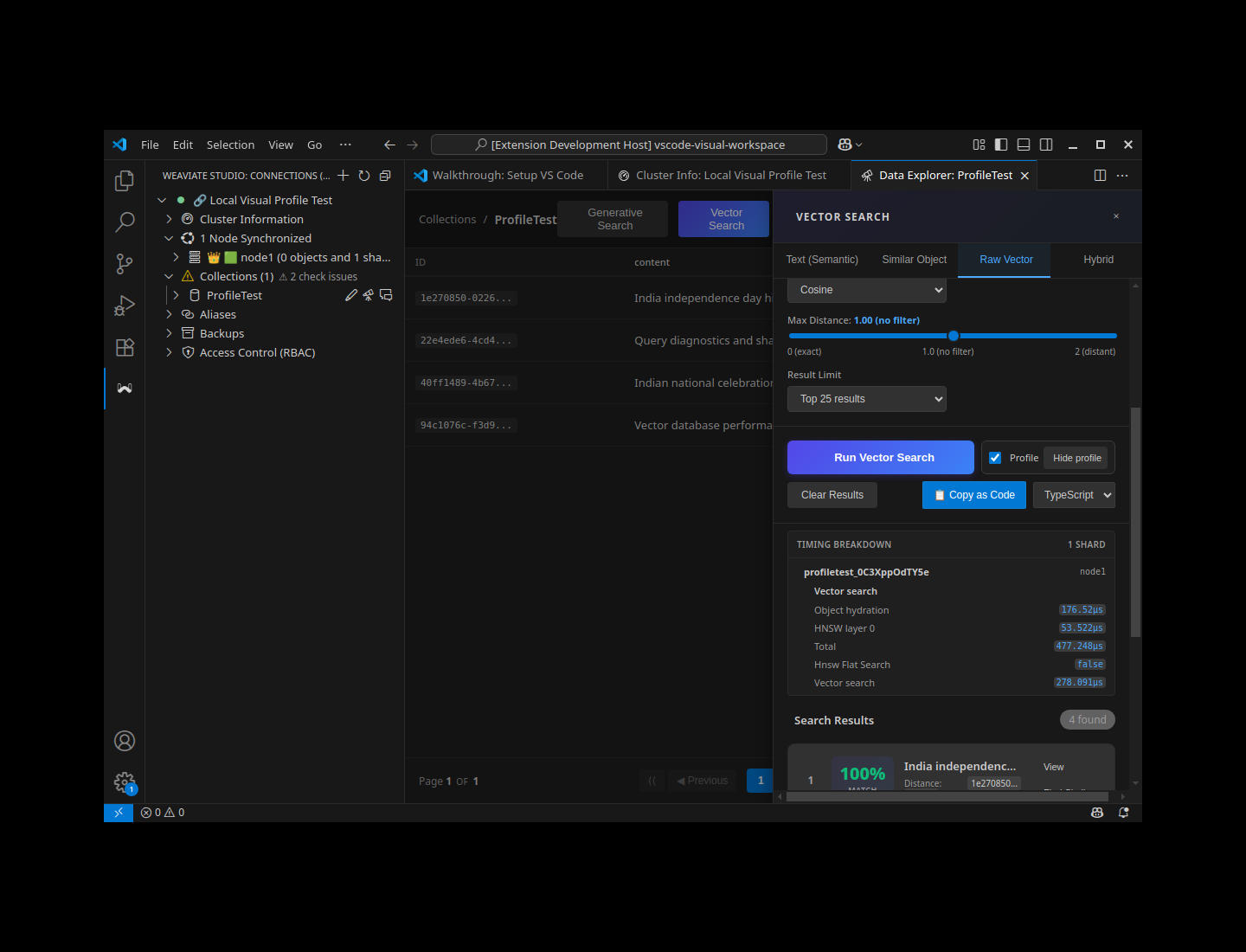
Query profiling is an opt-in diagnostic tool for understanding where a search spends time. It keeps the normal result workflow uncluttered: turn it on beside the primary search action, run the query, and open the detail panel only when the returned timings are useful.
Profile a Search
- Open Vector Search from Data Explorer.
- Check Profile, immediately beside Run Vector Search.
- Run a Text (Semantic), Similar Object, Raw Vector, or Hybrid search that your collection supports.
- After results arrive, select View profile. Select Hide profile to collapse the details again.
Remembered preference: The extension remembers the Profile setting across collection changes and Data Explorer panel reopens. Turn it off when you no longer want timing metadata requested with searches.
Timing Breakdown
The disclosure lists every shard that returned profiling data. Each shard identifies its node and includes only the search sections and metrics that were reported for that query. A vector search can, for example, show object hydration, HNSW traversal, total processing time, flat-search status, and vector-search time.
| Metric | What it helps you understand |
|---|---|
| Total | The reported wall time for the shard search. |
| Vector Search | Time spent in the vector index. |
| HNSW Layer N | Per-layer HNSW graph traversal time; Layer 0 commonly represents the largest traversal workload. |
| Rescore (decompression) | Time reading full-precision vectors when compression is enabled. |
| Filter Allow List | Time resolving a where filter through the inverted index. |
| Filter IDs Matched | The number of object IDs admitted by the filter. |
| Object Hydration | Time loading the final objects. |
| Flat Search | Whether Weaviate used a brute-force scan for that search. |
For hybrid or keyword-oriented requests, Weaviate can also return keyword/BM25 metrics such as Term Time and BMW Time. The exact set of rows depends on the query and server response.
Use the Result
| If the breakdown shows | Investigate |
|---|---|
| Object Hydration is large | Reduce the result limit, select fewer properties, or evaluate the size of returned objects. |
| Filter Allow List is large | Make the filter more selective and review the collection’s inverted-index configuration. |
| HNSW Layer 0 or Vector Search is large | Review vector-index settings such as ef, query dimensionality, and search workload. |
| Rescore is large | Check disk I/O and the trade-offs of the configured vector-compression strategy. |
Troubleshooting
| Situation | What to do |
|---|---|
| Profile is disabled | Confirm that the connection uses Weaviate 1.36.9 or later. |
| No View profile action appears after a search | Confirm that Profile was enabled before running the query, then rerun it. |
| The detail panel says no timings were returned | The server did not return per-shard profile data for that request; try another compatible query or check the server configuration. |
| Text (Semantic) search fails | Use a collection with a text vectorizer, or switch to Raw Vector / another supported search mode. |
Exporting Data
Choose from three export scopes:
| Scope | Description |
|---|---|
| Current Page | Only visible rows |
| Filtered Results | All objects matching current filters |
| Entire Collection | Every object in the collection |
Export options include:
- Include/exclude metadata (
_additionalfields) - Include/exclude vectors
- Flatten nested objects
- CSV or JSON format
Large Exports
Exporting more than 10,000 objects may take significant time. Progress indicators and cancellation are available.
Keyboard Shortcuts
| Shortcut | Action |
|---|---|
Ctrl+F | Focus filter search |
Ctrl+K | Open filter builder |
Ctrl+E | Export data modal |
Ctrl+R | Refresh current page |
User Preferences
Per-collection preferences are persisted across sessions:
- Visible columns and column order
- Sort direction and column
- Page size
- Filter presets
- Panel expanded/collapsed states